I always thinking on switching to Linux but every time I see a review or recommendation it’s always confusing, everyone recommends a different distro, and then others recommends just to select any and then begin with what they call the “distro hoping” which is change distro and search for the one that works best for you.
The only thing I see majority of comments coming into a sort of agreement, is that Fedora is one of the most reliable distros, but then someone else will say something negative as well about it. so I think Linux is like genetics, whatever one can use that works best for that specific individual.. after the Linux hoping thing. But regular consumer is not the type of person who can commit to things like that so I don’t know.
I will think about it next year, when I get to see more copilot stuff that will make me throw my pc through the window.
In fact, for those just thinking about trying Linux, you don't need to worry too much about choosing from all the hundreds of distros. It's best to start with those proven for this specific purpose. These are the ones that are easiest to get used to and have the least chance of breaking or messing up anything, including without your intervention (like rolling releases during updates, testing branches, etc). Just choose from the list of fixed (stable) releases. They are updated infrequently, and new versions of software and system components are thoroughly tested before being added to the update queue.
For beginners, also choosing an atomic OS (immutable) with a read-only file system can be a good solution. These will help avoid some user errors if you're unsure of what you're doing. Updates are only applied if there are no conflicts; otherwise, nothing will happen.
Well, look at the system requirements of a particular DE to make sure your computer can handle them. For example, for weaker hardware, better suited simpler DE's like XFCE, LXQT, LXDE, Cinnamon, MATE.
For beginners, it's best to choose a Debian-based distro, as it's the easiest to learn and has the most information and troubleshooting tips online. In this regard, distros like Mint and the Ubuntu family are the most preferable. Just choose any desktop environment you like and try it out. Linux can be run directly from a flash drive, allowing you to choose the visual style that suits you best. KDE Plasma and Cinnamon are the closest to Windows.
As for Fedora-based distros, they're a bit more complicated because they're designed differently. They have different specifics for working with repositories and installing programs not available in the "app store", and it's possible to break the package manager (I experienced this on Nobara), which is quite difficult to fix. Many dependencies are created, and at some point, a conflict or inconsistency can arise, and one mistake can lead to everything else.
Of the three, Arch-based distros are more challenging for beginners, but they're the most advanced for creating a custom system. I actually have limited Linux experience, but I settled on an Arch-based distro almost immediately, and it quickly taught me a lot of things =)
I tested about 30 different distros from a flash drive, but settled on Big Linux (based on Manjaro, which is based on Arch). It comes with many convenient utilities and settings out of the box, several interesting desktop environment templates ("like Windows," like Mac, like GNOME, Unity, etc.), and it's KDE Plasma. There are various tweakers, a large selection of hardware drivers, including various versions and variations of video drivers, the ability to change the kernel (not for beginners), etc.
The most important feature that should be configured immediately on any distro is enabling automatic system snapshots (recovery images), which will save you in case of unforeseen circumstances. This has saved me several times already. To do this, you need to choose a distro with support for the btrfs file system.
Finally, you don't have to completely abandon Windows on your computer. Simply install Linux alongside Windows and gradually learn and work with it. You can reboot back to Windows at any time, and vice versa.
This way, even if you need specific software that's completely missing from Linux, you can continue to use it. Or you can install it via "bridge" WINE in Linux.
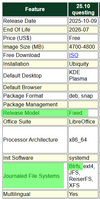
I'll add a screenshot from the Kubuntu page as an example of what a beginner should look for when choosing.